
Invoice automation is often framed as removing manual work, but that is only the surface layer. The deeper objective is to automate invoice processing in a way that makes the process predictable and defensible. When an AP process is predictable, invoices move through validation and approval without constant intervention. When it is defensible, the organisation can evidence why an invoice was paid, who approved it, and how exceptions were resolved.
Many automation projects struggle because they are treated as technology deployments rather than process decisions. If approval authority is unclear, coding standards are inconsistent, or exceptions are resolved informally, automation will not fix the underlying problem. It will simply move the confusion into a new tool and create frustration when the system doesn’t work.
A more reliable approach is to design invoice automation around governance first. Define the rules, define ownership, and then configure workflow to enforce them consistently. Done well, the process becomes simpler for AP and clearer for the business.
How to automate invoice processing for a reliable result
The first steps to automate are the ones that create structure. Centralised invoice receipt is a foundational improvement because it stops invoices living across personal inboxes and shared folders. Once invoices are captured into a controlled entry point, AP can establish consistent validation and tracking.
Validation is the next priority because it prevents incomplete invoices entering the workflow and wasting approver time. When basic requirements are enforced early, exception volumes drop and the process becomes less noisy. Routing is then the lever that makes ownership clear. If the right approver receives the invoice first time, cycle time improves without needing constant chasing.
These steps are not glamorous, but they remove a large portion of avoidable friction before you attempt more advanced matching or more complex exception handling.
The rules that need to be defined before automation
Automation depends on explicit rules. AP teams often have tribal knowledge about what counts as a valid invoice, when a PO is required, and what documentation is needed. That knowledge works until volume increases or people change roles. It is also difficult to defend because the process exists in people’s judgment rather than in policy.
Before automation, define what information is mandatory, how invoices should be coded, what approval pathways apply by spend type and value, and what documentation requirements apply for higher risk categories. Define what happens when information is missing, who owns that exception, and what the escalation path is if resolution stalls.
Once those rules are explicit, the system can enforce consistency, and AP can stop relying on memory and manual policing.
Why PO and non-PO invoices need different controls
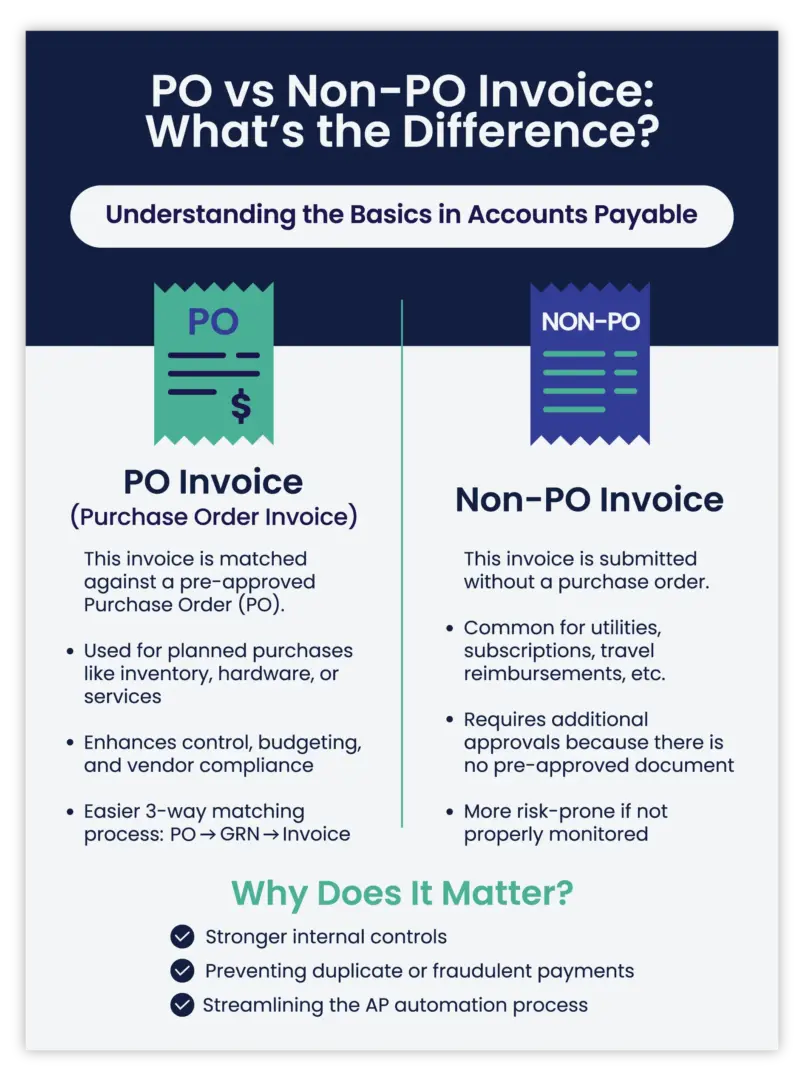
PO invoices are usually controlled through matching. The intent is to pay only for what was ordered and received, while recognising that real operations create variation. Price changes, partial deliveries, freight, and timing issues can create exceptions. A workable process sets variance tolerances that reflect the organisation’s risk appetite and operational reality. If tolerances are too strict, AP becomes a bottleneck. If they are too loose, the value of matching is diluted.
Non-PO invoices are controlled through coding discipline and approval authority. This pathway tends to carry greater risk because there is no pre-approved commitment record. It is also where coding questions can slow down processing. Automation should support templates and rules that help standardise coding, but it should also ensure approvals are meaningful and traceable.
Treating both invoice types as one workflow is one of the fastest ways to either slow the process or weaken controls.
What good exception handling looks like in practice
Exceptions are normal. The difference between a mature AP function and a chaotic one is whether exceptions are visible, owned, and resolved in a consistent way.
Good exception handling is structured. It categorises the reason an invoice cannot progress, assigns ownership to the right person or role, and records the decision and supporting notes when resolved. It also provides a clear escalation path. Without this structure, exceptions are handled via email and hallway conversations, and AP is left to reconstruct the story later.
That reconstruction is expensive. It also increases audit risk because it is hard to prove why a decision was made.
The role of capture, OCR, and eInvoicing in invoice automation
Capture technologies help with receipt and data extraction. eInvoicing can reduce manual handling where suppliers are enabled. These capabilities can reduce time spent on keying and reduce basic errors.
However, capture is not where most AP outcomes are won or lost. The bigger drivers are validation, routing, approval behaviour, and how exceptions are resolved. A strong automation design treats capture as the front door, then focuses investment on what happens after the door closes.
How to prove invoice automation is actually improving performance
The best proof is operational stability. Invoices should spend less time waiting unassigned, approvals should be quicker without being weaker, and rework should decline because exceptions are being handled consistently. Backlogs should be visible and managed, not discovered when suppliers escalate.
Some teams look at DPO changes as evidence, but DPO is an outcome measure and can be distorted by posting timing and approval delays. It is more defensible to pair DPO with workflow measures, such as cycle time from receipt to approval and the ageing of unapproved invoices.
Where software fits once the process is clear
Once rules, ownership, and pathways are defined, selecting workflow software becomes much easier. You can assess whether the tool enforces your rules, supports your exception model, and integrates reliably with the ERP. The goal is predictable invoice processing that is defensible at scale.
Frequently Asked Questions
What should we automate first if we’re still using shared inboxes?
Centralise invoice receipt first, then apply basic validation and routing. That sequence reduces lost invoices and stops approvals starting without the right information.
Can you automate invoice processing without a purchase order process?
Yes. You can improve control through validation, coding discipline, and approval authority, even where POs are not used for every category.
What rules need to be locked in before workflow configuration?
At minimum: mandatory invoice fields, when a PO is required, coding standards, approval thresholds, delegations, and how exceptions are owned and escalated.
How do we stop automation turning into rubber stamp approvals?
Make approvals contextual and traceable: route to the right owner, enforce authority, and require clear handling of exceptions rather than bypassing them to clear a backlog.
What’s the best way to prove the automation is working?
Look for reduced rework and fewer invoices sitting unassigned or stuck in email. Pair cycle time and backlog ageing with exception rates to show whether the process is becoming more predictable and defensible.