
Accounts payable workflow software is often evaluated with one question in mind: will it speed up approvals? Approval speed matters, but it is rarely the root problem. The deeper issue in many organisations is unstructured work. Invoices arrive in multiple channels, get forwarded around, exceptions are handled informally, and nobody can see where invoices are without asking AP.
When work is unstructured, AP becomes a coordinator rather than a control function. People chase. People escalate. People rework the same invoice multiple times because the process is not designed to keep context and decisions together. Workflow software should bring structure, visibility, and consistency. If it does, approvals often improve as a natural outcome.
This article explains what matters most in AP workflow software from a governance first perspective.
The core problem AP workflow software should solve
The core problem is not we can’t send invoices to approvers. The core problem is that the organisation cannot reliably see the invoice lifecycle. Without visibility, it is difficult to manage bottlenecks, difficult to enforce ownership, and difficult to reduce supplier enquiries.
A workflow tool should give AP and the business a consistent view of what has been received, what is awaiting action, and where exceptions are stuck. It should also preserve context so approvals are made with the right information.
Routing matters more than reminders
Reminders are useful only when the right person already has the invoice. Routing is the control lever because it determines whether the right person sees the invoice the first time.
In many organisations, invoices bounce around because cost centre ownership is unclear or because approval authority is not embedded in the process. Every bounce creates delay and increases the risk that someone approves without full context just to clear the backlog.
A strong workflow approach aligns routing to how the organisation actually controls spend. A structured invoice approval workflow should route invoices based on delegation of authority, cost ownership, invoice type, and approval thresholds.
Exception handling determines workflow success
Exceptions are inevitable. Matching issues, missing information, coding questions, and disputes happen in every organisation. The question is whether exceptions are managed within the workflow or handled outside it.
When exceptions are handled outside the workflow, visibility collapses. Decisions are made in emails, then the invoice is updated later with limited evidence. Over time, the system becomes a routing tool rather than a governance tool.
Workflow software should support structured exception states, clear ownership, and recorded decisions. That is what makes exceptions manageable and makes improvement possible over time.
Meaningful visibility in AP workflow
Visibility is not about dashboards for the sake of dashboards. It is about the practical ability to answer questions without chasing:
- Where is the invoice?
- Who has it?
- How long has it been there?
- Why is it stuck?
Meaningful visibility supports supplier enquiry reduction and helps AP manage bottlenecks. It also supports finance leadership because it shows whether delays are caused by approval behaviour, by a specific exception type, or by an upstream issue such as missing PO discipline.
A usable audit trail for real-world audits
Audit trails must be practical. They need to show who approved, when they approved, what changed, and what supporting documents were present. They also need to be searchable and retrievable without reconstructing the story from scattered files.
A usable audit trail reduces audit effort and reduces dispute friction because the organisation can evidence decisions quickly.
The role of accounts payable workflow software in AP automation
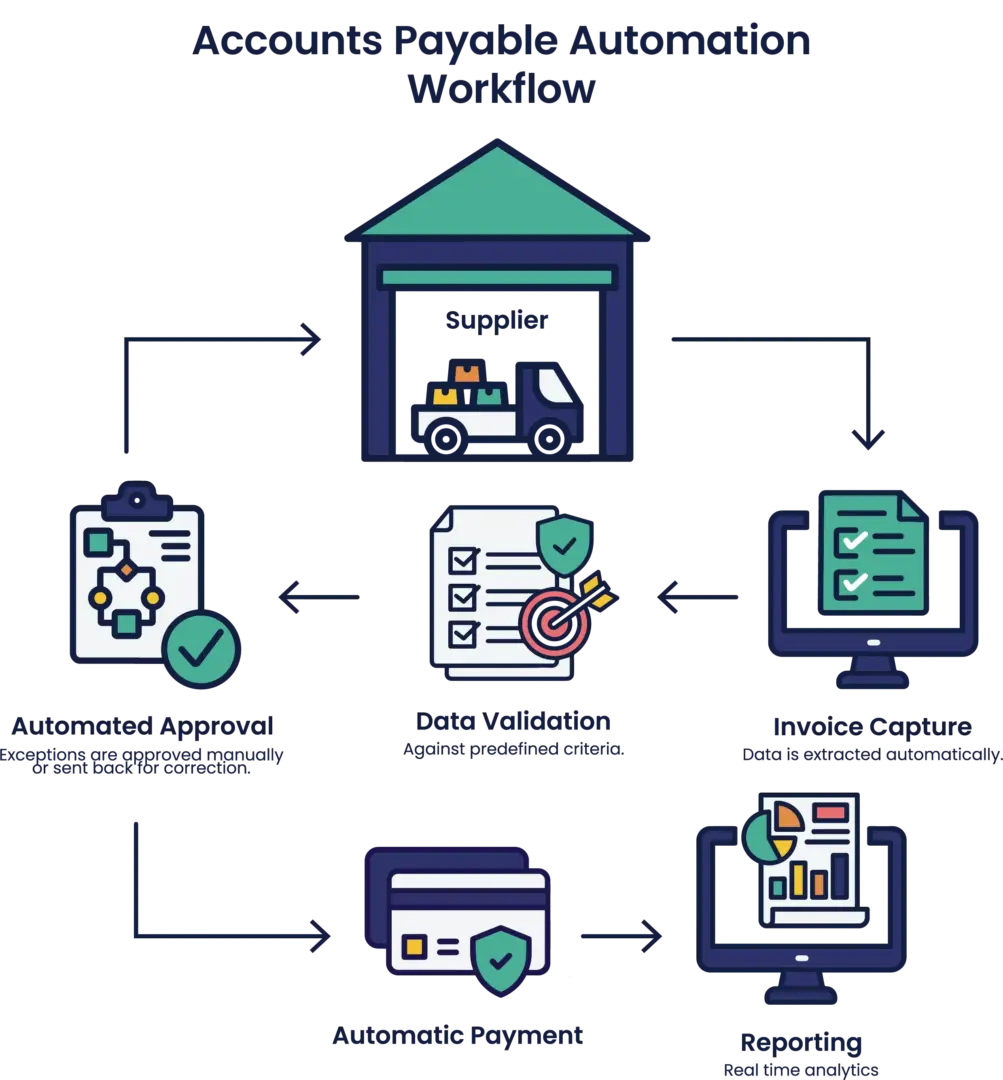
Workflow is the centre of AP automation because it is where rules are enforced consistently. Capture helps, but workflow determines whether invoices progress in a controlled way and whether evidence is retained. The best accounts payable automation software supports this by combining capture, workflow rules, approvals, audit trails, and ERP integration in one governed process.
If workflow is weak, the rest of the AP process becomes dependent on individuals and inbox management. If workflow is strong, AP becomes a governed pipeline that is easier to measure, improve, and scale.
Workflow should enforce controls, not just move invoices
This is the feature many teams assume they will configure later, then discover the platform cannot enforce it properly. Controls are what make workflow defensible, not just efficient.
A workflow tool should be able to enforce the organisation’s rules consistently, including approval thresholds, delegated authority, and separation of duties. It should also support practical validation, such as requiring key fields before an invoice can progress, preventing obvious duplicates before approvals, and ensuring the right supporting documentation is attached for higher risk categories.
If workflow only moves invoices from person to person, AP still carries the burden of policing compliance manually. That defeats the point. The process should apply controls by design so that AP can focus on managing exceptions rather than checking everything twice.
ERP integration should support workflow resilience
AP workflow software is not an island. It relies on master data and posting rules from the ERP. Suppliers, GL codes, cost centres, tax codes, and approver structures all change over time. A workflow tool needs to stay aligned to those changes or it will create workarounds.
Good integration is not just we export to the ERP. It is how the workflow behaves when something fails. If an invoice cannot be posted because a supplier is inactive or a cost centre is invalid, the invoice should not disappear into a technical queue. It should remain visible, assigned, and resolvable within the workflow, with clear ownership of the fix.
When integration is well designed, AP can trust that approved means ready to post. When it is not, AP ends up running parallel tracking spreadsheets, which undermines visibility and governance.
Key takeaways
- Strong AP workflow software solves unstructured work by making invoice status and ownership visible end to end.
- Routing and exception handling matter more than reminders because they prevent rework and hidden delays.
- Audit trails must be usable and searchable, not just technically available.
- The missing make or break features are control enforcement and ERP aligned integration with clear error handling.